Why every board farm conversation starts with labgrid
If you build embedded Linux products, chances are you have met labgrid: the open-source framework from Pengutronix for controlling boards, automating bootloaders, and writing hardware-in-the-loop (HIL) tests in pytest. It is mature, actively maintained, battle-tested in real board farms, and free. When we tell people we built a remote board farm platform, labgrid is the name everyone in the room is already thinking of — so instead of talking around it, this post addresses it head-on.
The short version: labgrid and fernsteuerung.io are not solving the same problem. Labgrid is a test framework that assumes a trusted lab network and deliberately leaves authentication, enforced access control, and image management out of scope. fernsteuerung.io is a device management platform that exists precisely to provide that layer: auth, per-device permissions, enforced leases, a central image hub, and a web UI — wrapped around your own hardware.
The long version follows: what labgrid does brilliantly, what it excludes on purpose, a side-by-side comparison, and a decision guide. At the end there is a twist — you may not have to choose at all.
What is labgrid — and where does it shine?
In its own words, labgrid is “an embedded board control python library with a focus on testing, development and general automation”. That self-description is precise: it covers remote board access through a client–exporter–coordinator infrastructure, a pytest plugin for automated embedded testing, serial console and SSH interaction, power and reset management, and USB bootstrapping of devices.
Under the hood it is a Python library plus a small distributed system. The
labgrid coordinator keeps track of boards
(“places”), labgrid exporters run on the machines
physically wired to the hardware,
and clients — labgrid-client or pytest — acquire places
and drive them through a well-designed resource/driver abstraction.
Where it is genuinely excellent:
- pytest integration. Hardware tests read like software
tests. Fixtures give you a booted board;
ShellDrivergives you a logged-in shell; strategies model boot-state machines. Nothing else in the open-source world matches this depth. - Hardware abstraction. Dozens of drivers for power switches, SD-muxes, bootloader recovery, USB relays, and serial consoles — composed declaratively in YAML.
- Full self-hosting. Everything runs on your infrastructure. For organizations that cannot let a third party into the loop at all, that is a hard requirement labgrid satisfies completely.
- Maturity and community. Years of production use in professional embedded labs, active development, responsive maintainers.
If your team lives in pytest, runs a trusted lab network, and wants to own every layer of the stack, labgrid is a superb choice. We mean that without a “but”.
Labgrid authentication: why there is none — by design
Here is the part most comparisons gloss over. Labgrid’s architecture is not missing features by accident — its documentation is explicit that it targets a trusted lab network. From that single assumption, several deliberate scope decisions follow:
- No authentication. The coordinator accepts connections
without TLS or tokens. A client’s identity is a self-declared
hostname/usernamestring — documented as overridable, which CI setups routinely do. - Cooperative locking. The coordinator tracks who acquired
a place and rejects a double acquire, but it cannot enforce exclusivity at
the resource layer: every console endpoint is published to every connected
client, and nothing stops a direct
telnetto a ser2net port someone else has locked. On a trusted network that is fine — well-behaved tooling keeps colleagues from stepping on each other. - No central image store. Images are rsynced over SSH into per-user scratch directories on each exporter and cleaned up after a couple of days. Labgrid’s own design documentation declares image management out of scope.
- No official web UI beyond a contrib graph viewer, and no user management — there are no users to manage.
You do not have to take our word for any of this — the maintainers say it themselves. When the OpenWrt community asked whether labgrid could be used to share boards across organizations (labgrid discussion #957), a labgrid maintainer laid out the position clearly: labgrid’s design “expects it to be run in a trusted environment”, so there is no authentication for the coordinator. Labgrid has no credentials of its own — access is restricted via network firewalls or granted via SSH keys. Early on, the project decided “to not handle authentication and permissions in labgrid itself, but to rely on existing tools” such as SSH, unix users, and network segmentation. And everyone with access to the coordinator can configure places. That is a coherent design — and it also draws a sharp boundary: the moment your access model outgrows “everyone on this network is trusted”, you have left labgrid’s intended territory.
That missing layer is fernsteuerung.io’s entire reason to exist.
Labgrid vs. fernsteuerung.io: side by side
A scannable summary before the deep dives. “By design” means labgrid’s documentation explicitly scopes the capability out — not that the project overlooked it.
| Aspect | labgrid | fernsteuerung.io |
|---|---|---|
| Deployment | Self-hosted coordinator + exporters you install and operate | Managed SaaS control plane + one lightweight node agent per lab machine |
| Cost & licensing | Free, open source (LGPL-2.1) | Managed SaaS subscription with a free tier |
| Authentication | None (by design) — trusted network, self-declared identity | Accounts, API tokens with scopes, per-device permissions and roles |
| Device locking | Cooperative place locks, checked client-side | Server-enforced leases with TTL and automatic expiry |
| Image handling | rsync over SSH to per-exporter scratch dirs (out of scope by design) | Central S3-backed image hub with tags, presigned URLs, one-click flash |
| Yocto workflow | Flashing works, but getting the image onto the right exporter is your job | Yocto-native end to end — CI uploads the
.wic image once, anyone authorized flashes that
exact artifact; snagboot recovery flashing included |
| Interface | CLI (labgrid-client) + Python API |
Web UI + REST API + fernctl CLI + MCP server |
| Serial console | ser2net / microcom in a terminal; opt-in client-side logging | Live xterm console in the browser over WebSocket |
| Log storage | Opt-in logfiles on the client (pytest --lg-log,
console --logfile) — nothing stored
centrally |
Planned: server-side log storage — searchable console history, linked to the image that booted |
| Test framework | Deep pytest integration, strategies, driver ecosystem — labgrid’s home turf | Language-agnostic REST/CLI; labgrid driver package for existing suites (see below) |
| Hardware handoff | Freeing a port for external tools means stopping or reconfiguring the exporter | Attach/detach releases USB handles so external tools can take over, then hand back |
| AI agents | Nothing built-in (scriptable via Python/CLI) | First-class MCP server — AI coding agents can lease, flash, and debug real boards |
Labgrid place locks vs. server-enforced leases
The deepest difference is not a feature — it is who does the enforcing.
In labgrid, the coordinator does reject a second
labgrid-client acquire on a taken place — but enforcement
stops at that RPC. The coordinator hands the console endpoints of every place
to every connected client, and nothing on the server side stops a
misconfigured CI job — or a curious colleague with telnet
— from opening a ser2net console someone else has locked. Exclusivity
holds at the bookkeeping layer, not the resource layer. Again: on a trusted
network, acceptable. Across teams or networks, not.
fernsteuerung.io flips the model. A lease is granted by the server, bound to your identity, and committed in two phases: a database transaction plus a physical attach on the node agent. Every subsequent operation — power, console, flash — is checked against the active lease. And because leases carry a TTL, a crashed CI job or a developer who went home for the weekend cannot brick your board availability: the lease expires and the device returns to the pool on its own. No “who forgot to release the place?” message in the team chat.
Credit where due: labgrid does have a queueing story —
labgrid-client reserve lets a CI job wait for a matching place,
which is a daily tool in busy farms. fernsteuerung.io answers the same need
with lease requests that return a Retry-After hint when a device is taken, so
CI jobs back off and retry instead of failing outright.
On top of leases sit accounts, per-device permissions, and scoped API tokens — so a contractor can see exactly one board, and a CI token can flash but not delete.
Labgrid image management vs. a central image hub
Labgrid treats image distribution as your problem, and says so in its design
docs. Flashing itself is covered — labgrid-client write-image
--mode bmaptool writes a wic image through a USB-SD-Mux just fine
— but getting the image there means rsync over SSH into a per-user cache
directory on whichever exporter is wired to your board, reaped automatically
after a couple of days. To be fair, for a single developer iterating against
the board on their desk, rsync to a LAN-local exporter is hard to beat. The
pain starts the moment “where is the latest nightly?” involves a
second person, a second site, or a CI pipeline.
fernsteuerung.io ships a central image hub: S3-backed storage
with tagging, presigned upload/download URLs for CI, and one-click flashing from
the web UI or a single fernctl flash command. Your Yocto pipeline
uploads once; every authorized user and device can flash that exact artifact
— with progress streamed live. The full workflow is in our
bitbake-to-board
guide.
And this is where our bias is intentional: fernsteuerung.io is
Yocto-native. The platform flashes full disk images the way a Yocto
build produces them — wic images with their
.bmap block maps, written by bmaptool so only the
mapped blocks hit the SD card or eMMC — and when a board will not boot
from SD at all, snagboot-based UMS/DFU recovery flashing takes over. The
difference is everything around that moment: the artifact that falls out of
bitbake is uploaded once, tagged, and flashable by every
authorized user, device, and CI job from then on — no rsync to the right
exporter, no scratch-dir expiry. The whole idea is to make Yocto development
genuinely pleasant: build, upload, flash, boot, console, all without leaving
your desk. The details are in
Tailored for Yocto:
wic, bmaptool, and snagboot.
One more thing on the roadmap: the hub will not stay exclusive to our storage. We plan to let every customer plug in their own S3-compatible image hub — a company bucket, a MinIO instance in your lab, an existing artifact store — and have the platform flash directly from it. Your images, your bucket, our workflow.
Does labgrid have a web UI? CLI vs. browser, API — and AI agents
Labgrid is CLI- and code-first, and power users like it that way. But it means every person who touches a board needs the Python client installed, the coordinator address at hand, and at least a working notion of places and resources. For the test-automation engineer that is Tuesday; for the application developer who just wants to see why their service did not start on boot, it is a wall.
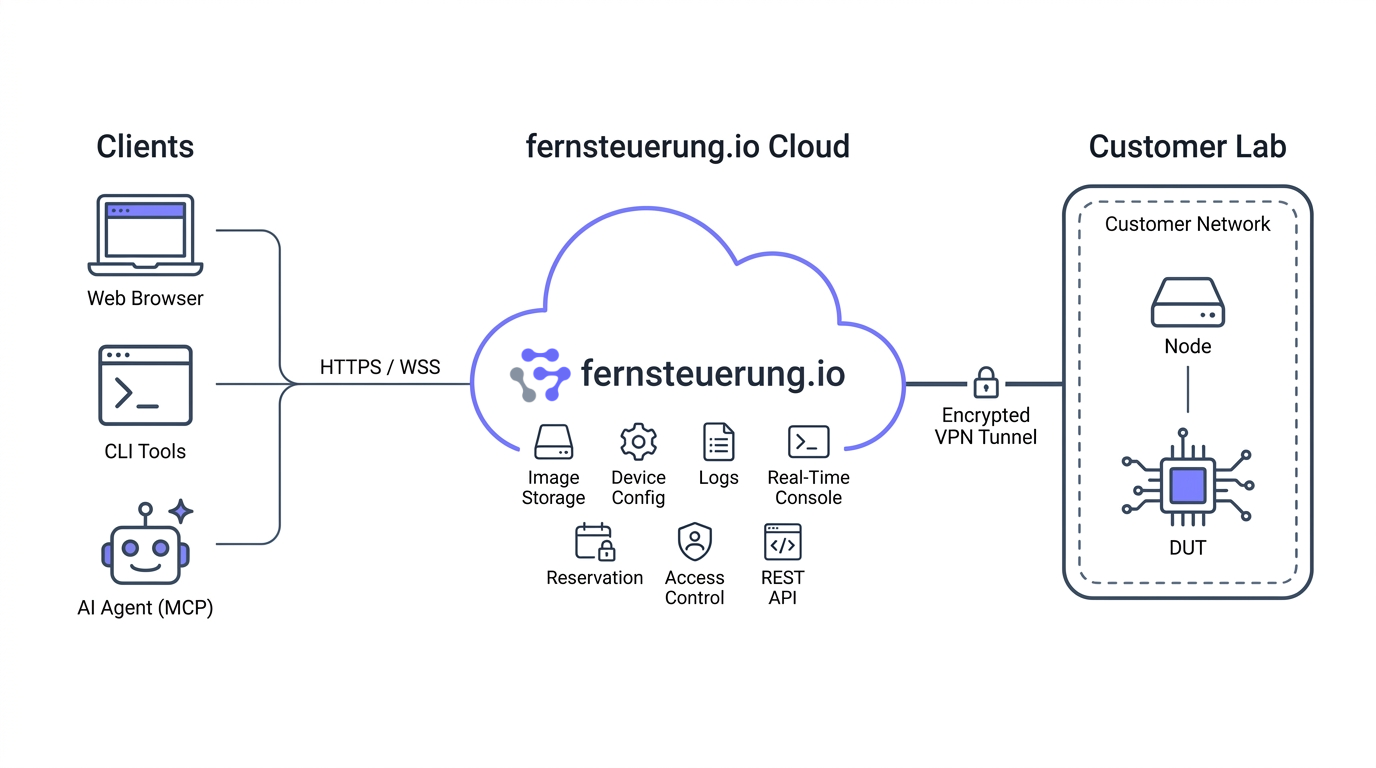
fernsteuerung.io offers four access modes:
- Web UI — power control, flash with progress, lease management, and a live remote serial console in the browser. Open a tab, see the UART.
- REST API — language-agnostic, token-authenticated; wires into your embedded CI pipeline, whether that is Jenkins, GitHub Actions, GitLab CI, or a shell script.
fernctlCLI — a single static binary for lease, power, console, image, and flash operations.- MCP server — AI agents like Claude Code or Cursor can lease a board, flash it, watch the boot log, and run commands on their own. We wrote that story up in MCP for Embedded Linux.
One more capability without a labgrid equivalent:
attach/detach. Detaching tells the node agent to release its
USB handles so an external tool — a debugger, a vendor flash utility, a
hand-rolled script — can talk to the hardware directly. Re-attach, and the
platform takes over again. Mixed workflows stop fighting over
/dev/ttyUSB0.
Labgrid or fernsteuerung.io: when to choose which
Choose labgrid when…
- Your whole team is on one trusted lab network
- You live in pytest and want the deepest test-framework integration available
- Full self-hosting is a hard requirement
- You have the appetite to own the full labgrid setup — coordinator and exporters — yourself
Choose fernsteuerung.io when…
- Multiple people, teams, or CI systems share the hardware
- Access crosses network or organizational boundaries
- You want auth, enforced leases, and per-device permissions without building them
- Non-CLI users need the board too — browser console, one-click flash
- Your builds come out of Yocto and you want
wic/bmaptoolflashing out of the box - Images should live in one hub, not in scratch dirs per lab machine
Notice what is not on either list: test quality. Labgrid does not make your tests better or worse than our API does, and vice versa. The real decision is about who accesses the hardware, from where, and who enforces the rules.
Plot twist: run your labgrid pytest suites on fernsteuerung.io
Everything above frames this as labgrid versus fernsteuerung.io. But labgrid’s cleanest architectural idea — the driver protocol layer — makes a third option possible: keep your labgrid test suites, and let fernsteuerung.io play the role of coordinator, exporter, and lab network all at once.
Frequently asked questions
Is fernsteuerung.io a labgrid alternative?
It depends on what you need. If you want a self-hosted test
framework with deep pytest integration on a trusted lab network, labgrid is
excellent and fernsteuerung.io does not replace it. If you need a
multi-user, internet-facing platform with authentication, enforced device
leases, a web UI, and central image storage, that is exactly the layer
labgrid deliberately does not provide — and where fernsteuerung.io
fits. And with the labgrid-fernctl driver package, the two can
be combined.
Does labgrid have authentication or user management?
No — by design. The coordinator accepts unauthenticated connections, and a client’s identity is a self-declared hostname/username string. The maintainers have stated this position publicly in discussion #957: labgrid expects a trusted environment, has no credentials of its own, and relies on firewalls, SSH keys, and unix permissions instead. Reasonable for a single team on one LAN; unsuitable for anything crossing team or network boundaries.
Are labgrid place locks enforced?
Only at the bookkeeping layer. The coordinator rejects a second acquire on a taken place, but it publishes console endpoints to all connected clients — nothing stops a direct connection to a ser2net port someone else has locked, so well-behaved tooling is what keeps users apart. fernsteuerung.io enforces exclusivity server-side with TTL-bound leases that expire automatically if a job crashes.
Can I keep my existing labgrid pytest test suites?
Mostly, yes. The labgrid-fernctl package
implements labgrid’s power and console driver protocols on top of
the fernsteuerung.io API, with more on the way. Point an environment YAML
at a managed board and run pytest as usual — suites
built on ShellDriver, strategies, and console fixtures work
unchanged. Drivers that need direct network access to the board, such as
SSHDriver, are not covered yet. Full post coming soon.
Do I have to self-host anything with fernsteuerung.io?
Only a lightweight node agent on the machine physically connected to your board — it drives the power switch, serial adapter, and USB-SD-Mux. Auth, device registry, leases, the image hub, and the web UI are managed for you. See the remote board farm setup guide for the hardware list.
How does my browser reach a board behind the lab firewall?
The node agent exposes a local HTTP and WebSocket API and must be reachable by the control plane and your users — in practice behind a TLS reverse proxy at your lab’s edge. Serial console data flows directly between the browser and your lab machine; it does not pass through the control plane. If the control plane is briefly unreachable, open console sessions stay alive — only new leases, flashes, and permission changes wait until it is back.
Is labgrid still maintained? Should I avoid it?
Labgrid is actively maintained, widely deployed, and very good at what it targets. Nothing in this comparison says otherwise — the differences are about scope, not quality. If its trusted-network model matches your lab, use it with confidence.
See the difference on your own board
The fastest way to evaluate the comparison above is to connect one board: a power switch, a serial adapter, a USB-SD-Mux, and the node agent. Ten minutes later you have a browser console, enforced leases, and an image hub — no coordinator or exporter infrastructure to run.
Create a free account Read the setup guideNo credit card. Free tier included.